> For the complete documentation index, see [llms.txt](https://honeyland-player-guides.gitbook.io/honeyland-player-guides-docs/llms.txt). Markdown versions of documentation pages are available by appending `.md` to page URLs; this page is available as [Markdown](https://honeyland-player-guides.gitbook.io/honeyland-player-guides-docs/the-game/general-player-guides/in-game-staking-activate-assets-and-hxd-player-guide.md).
# In-game Staking - Activate Assets and HXD - Player Guide
### Activate (stake) Assets
### Bees, Queens, Lands, and Passes in-game
* Tap the main menu in the upper right corner of the game
* Tap the Stake icon
* Tap the asset you wish to stake
* Tap Add
* Repeat for any other assets you want to stake
* NOTE: You can stake up to 10 assets at a time
* Once you have moved the assets you want to stake to the left column, tap the Stake button
* Approve the transaction in your wallet
* Your assets are now staked and can be used in the game
### Bees, Queens, Lands, and Passes using HiveMind
To stake Bees, Queens, Lands, and Passes, visit the game's companion website HiveMind at
* Click on the “Connect Wallet” button to connect your wallet.
* When connected, click on “Staking” in the top right corner.
* On the staking page, click on “Unstaked” to get a list of all your unstaked assets.
* Click either "stake" (to stake a single asset) or "bulk" (can stake up to 10 assets per transaction) button.
* Select each of the assets you want to stake.
* Click the "Stake selected" button.
* Approve the transaction in your wallet
* Navigate to the "Staked" tab where you will find your newly staked assets. You can now use your staked assets in the Honeyland game.
### Stake HXD
* Visit the staking site at
* Connect your wallet
* Choose your lockup period
* Enter the amount you wish to stake
* Tap Stake
* Approve the transaction in your wallet
Further details about HXD staking [here](/honeyland-player-guides-docs/the-game/general-player-guides/in-game-staking-activate-assets-and-hxd-player-guide.md)
### Using a Ledger wallet
{% hint style="info" %}
NOTE: If you are using a Ledger wallet, be sure to move the Using Ledger toggle to Enable "Using Ledger" 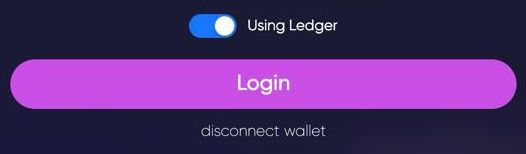
{% endhint %}
Ensure that the Solana app is activated on your Ledger device
Activate blind signing mode on your Ledger device
### Staking Rewards
Staked HXD earns VIP Points and HXD
For each of your staking plans, multiply the amount of HXD you have staked by the corresponding multiplier in the chart below. Total the points from all of your staking plans to determine your daily staking VIP points. Accumulated staking VIP points can be claimed by visiting the [staking site](https://stake.honey.land/).
| **Stake Length (Months)** | **Multiplier** |
| ------------------------- | -------------- |
| 1 | 1x |
| 3 | 1.25x |
| 6 | 1.5x |
| 12 | 2x |
Daily VIP Points for on-chain staking
| **Staking Points** | **Daily VIP Points** |
| ------------------ | -------------------- |
| up to 19,999 | 25 |
| 20,000-49,999 | 50 |
| 50,000-99,999 | 100 |
| 100,000 and above | 200 |
### Assigning HXD staking rewards to a different wallet
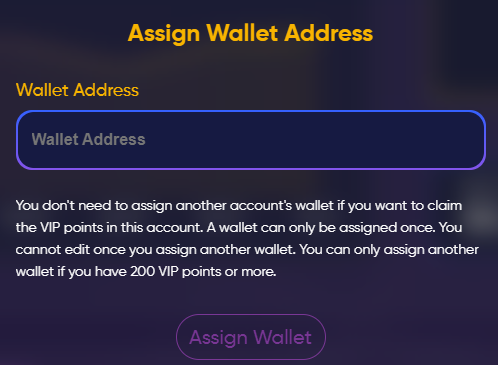
If you staked tokens from a wallet other than your game wallet, you can use the “Assign Wallet” system to assign the VIP points to your game wallet.
{% hint style="info" %}
NOTE: Assigning your staking points to a different wallet is a permanent decision.
{% endhint %}

* You can only receive staking VIP points from staking HXD using your game wallet and ONE other wallet
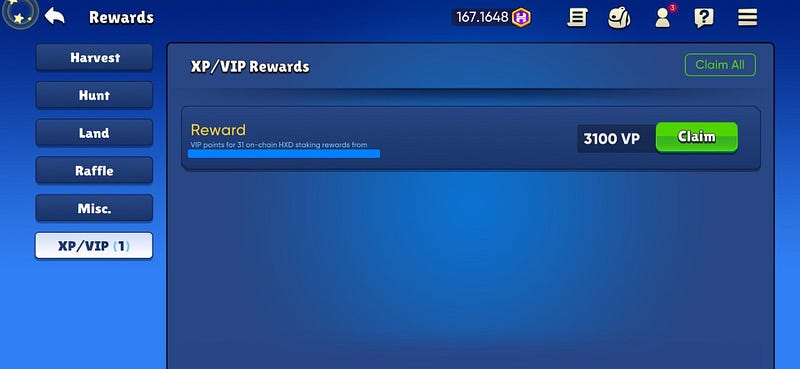
* Claiming the VIP points on the staking site will send the VIP points to the rewards screen of your game — visit your rewards screen to claim them
### "Stake request failed" error on HiveMind
Hivemind "Stake Request Failed" Troubleshooting:
* Make sure you have SOL in your wallet to cover the transaction fees. A minimum of 0.1 SOL is a good amount.
* Make sure your asset (if an Egg) isn't still in incubation. Incubation ended in late 2022 so there is no need to continue incubating your Eggs. You can release your eggs from incubation using .
* Make sure your asset isn't listed on one of the marketplaces.
* Clear browser cache and cookies.
You can see your current Staking Score by visiting the [staking site](https://stake.honey.land/).
---
# Agent Instructions
This documentation is published with GitBook. GitBook is the documentation platform designed so that both humans and AI agents can read, navigate, and reason over technical content effectively. Learn more at gitbook.com.
## Querying This Documentation
If you need additional information that is not directly available in this page, you can query the documentation dynamically by asking a question.
Perform an HTTP GET request on the current page URL with the `ask` query parameter:
```
GET https://honeyland-player-guides.gitbook.io/honeyland-player-guides-docs/the-game/general-player-guides/in-game-staking-activate-assets-and-hxd-player-guide.md?ask=
```
The question should be specific, self-contained, and written in natural language.
The response will contain a direct answer to the question and relevant excerpts and sources from the documentation.
Use this mechanism when the answer is not explicitly present in the current page, you need clarification or additional context, or you want to retrieve related documentation sections.